Sunday, April 11, 2010

Animated code coverage

I recently spent a fair amount of time collecting historical code coverage data for Thunderbird; the result is 312 distinct files of raw lcov data covering the first year of Thunderbird in a mercurial repository. I also recently wrote a program that makes a treemap for each day (thanks to the geninfo man page and this treemap library), and then wrote another program to convert that treemap into a static PNG image:

view.setSize(1920,1080);
BufferedImage image = new BufferedImage(view.getWidth(),
  view.getHeight(), BufferedImage.TYPE_INT_RGB);
view.paint(image.getGraphics());
ImageIO.write(image, "png", new File(args[1]));
System.exit(0);

I ran that tool to create images for every single day, and then I made another short script to add dates to each of the images (ImageMagick works really well here):

DATE=$(echo $1 | cut -d'.' -f1)
convert -fill "#aaa" -pointsize 50 label:"$DATE" /tmp/label.png
composite -compose Multiply -gravity southwest /tmp/label.png $1 anno-$1

Now, with 312 images on hand, I decided to make them into a video:

mencoder mf://out/anno-*.png -mf w=1920:h=1080 -ovc lavc -lavcopts vcodec=ffv1 -of avi -ofps 3 -o output.avi

I then converted the high-def, lossless AVI into an Ogg file, and produced the following animated video of historical code coverage:

Okay, so no sound yet for the animation—the encoding is painful enough that I don't want to try it out right now. I also didn't filter out any of the days where the tests failed early, so you will occasionally see flashes of red. The data also doesn't have recent stuff (I am holding off until I can figure out how to run mozmill tests and get JS code coverage). Anyways, enjoy!

Sunday, April 4, 2010

Developing new account types, Part 2: Message lists

This series of blog posts discusses the creation of a new account type implemented in JavaScript. Over the course of these blogs, I use the development of my Web Forums extension to explain the necessary actions in creating new account types. I hope to add a new post once every two weeks (I cannot guarantee it, though).

In the previous blog post, I showed how to get an account displayed in the folder pane. Now, we will prepare the necessary components of getting an empty message list displayed in the folder pane.

Database basics

As mentioned previously, the database is one of the key components of an account. It is, essentially, the object that actually stores the state of messages in folders and even some folder attributes themselves. The database is currently backed by a mork database (the .msf files you see in your profile storage); in principle, you could make your own database from scratch that doesn't use mork, but that is likely a very bad idea. [1]

Originally, as I understand it, the database was merely a cache of the data in the actual mailbox. Its purpose was to store the data that was needed to drive the user interface to prevent having to reparse the potentially large mailbox every time you opened up Netscape. The implicit assumption here was that blowing away the database was more or less lossless. Well, times change, and now such actions are no longer lossless: pretty much any per-folder or finer-grained property is stored in the message database; in many cases, these properties are not stored elsewhere.

The database itself is represented by the nsIMsgDatabase interface. Messages and threads are represented by the nsIMsgDBHdr and nsIMsgThread interfaces, respectively. Per-folder property stores are represented by nsIDBFolderInfo. Finally, the code to open a new database comes from nsIMsgDBService. Most of the database stuff just works; subclasses would implement only a few methods to override the default ones.

Getting databases

There are two main entry points for getting databases: msgDatabase, and getDBFolderInfoAndDB. Both of these must be implemented for anything to work:

wfFolder.prototype = {
  getDatabase: function () {
    if (this._inner["#mDatabase"])
      return this._inner["#mDatabase"];
    let dbService = Cc["@mozilla.org/msgDatabase/msgDBService;1"]
                      .getService(Ci.nsIMsgDBService);
    let db;
    try {
      db = dbService.openFolderDB(this._inner, false);
    } catch (e) {
      db = dbService.createNewDB(this._inner);
    }
    this._inner["#mDatabase"] = db;
    return db;
  },
  getDBFolderInfoAndDB: function (folderInfo) {
    let db = this.getDatabase();
    folderInfo.value = db.dBFolderInfo;
    return db;
  },
};

This portion of the code can turn out to be surprisingly complicated. What is listed is generally a safe option: if the database is incorrect (out of date or non-existent), blow away the database and re-retrieve the information from other sources. Recreating the database is done in the catch statement. Then we set the member variable to be the newly-created database (this is also used by nsMsgDBFolder code) and we return it. Retrieving the folder info should be self-explanatory.

You may notice that when the database is invalid, all we do is create a new database: we don't try to fix it. This is because these calls to get the database are interested in getting a version of the database quickly: this is one of the calls the folder pane makes, and it is synchronous. Imagine what would happen if, say, a local folder which had a 3GiB backing store needed to be reparsed during this call. The actual recovery of the database would most likely happen when the folder is told to update.

Other stuff can be added to these calls. Not everything is necessarily stored in the database: news folders store their read information in the newsrc file, so it needs to sync this with the database in the method too.

Displaying an empty message list

If you just try to implement this code and run, you will discover that this is not sufficient to load the database. The key is in the getIncomingServerType function, which is what tells the database service which implementation of nsIMsgDatabase to use. For now, we can just use the default implementation of nsMsgDatabase, but we can't change the parameter output (otherwise URIs will get messed up). The solution is to create a DB proxy:

function wfDatabase() {}
wfDatabase.prototype = {
  contractID: "@mozilla.org/nsMsgDatabase/msgDB-webforum",
  _xpcom_factory: {
    createInstance: function (outer, iid) {
     if (outer)
        throw Cr.NS_ERROR_NO_AGGREGATION;
      return Cc["@mozilla.org/nsMsgDatabase/msgDB-default"].createInstance(iid);
    }
  }
};

What this does is use some XPCOM magic to link creating one contract ID to creating the other. I have not yet used the extend-C++-in-JS glue to create the ability to subclass nsMsgDatabase due to the fact that the nsIMsgDatabase interface is more complicated than the others, as well as it being more C++-specific codewise and generally less useful to override methods.

The next thing to do to display the list is to write a simple no-op implementation for updateFolder (the default implementation doesn't do this, for some reason [2]):

updateFolder: function (msgwindow) {
  this._inner.NotifyFolderEvent(atoms["FolderLoaded"]);
}

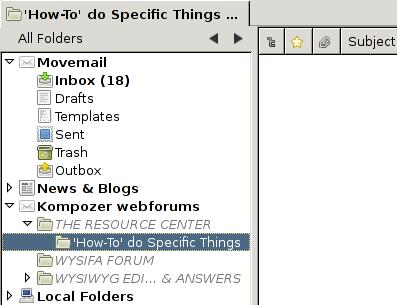
Here, atoms is merely is an associative array that contains a list of necessary atoms for the code. The end result of all of these changes is the following screenshot:

The database of an empty folder

In the next part, I'll cover how to replace that screenshot with one containing an actual folder list.

Notes

  1. As annoying as it would be, implementing nsIMsgIncomingServer or nsIMsgFolder from scratch is still somewhat feasible. I don't think the same holds true for nsIMsgDatabase (or the other database helper interfaces): static_casts permeate the code here, with the note that it is a "closed system, cast ok".
  2. If you're wondering why this post took so long to be produced, this is a major reason why. It turns out that not having this implementation causes the folder display to not display the database load, so it just displayed the server page with the server name changed to the folder name. That, on top of having no time to debug it.

Friday, April 2, 2010

Code coverage to the extreme

If all goes well, sometime tonight I will have completed 362 builds of Thunderbird, one for each day from July 24, 2008 to July 23, 2009 excluding August 3, 2008, December 25, 2008, and July 4, 2009 (more may turn up as I get more data; bonus points if you can figure out the significance of each of those days!). Included for each build is either a build log to tell me why the build failed or a test log telling me what ran. Also included is a copy of the Thunderbird code coverage data.

What, you may ask, do I intend to do with a year's worth of code coverage data? I intend to use this data to help answer some questions I have about our code coverage. Already, I've wondered about a more general overview of code coverage data (see my last post for more details). Now, I want to pose some of the following questions:

  • Whose code is not covered?
  • Who is adding code right now without making sure to cover it?
  • Whose tests are responsible for most improving code coverage?
  • How is code coverage being impacted over time?

My answers to these questions involves taking a snapshot of the code coverage data over time. That, however, proves to be a little more difficult than you'd imagine. First of all, hg doesn't support, as far as I can tell, an "update to what the repo looked like at this time" (hg up -d goes to the revision that most matches that date, not to a snapshot at that time). So I had to write a few scripts to pull out the revisions to look at. Second, gloda ruined some of this data. Fortunately, that's easy to tell due to the <1KB log files complaining about no client.mk. Then there's the issue of my revision logs containing m-c data, not m-1.9.1, so I have to hack around the client.py for Thunderbird trying to pull a different revision.

Another source of complaints was actually building and running the things. The computers I'm doing this on are all 64-bit Linux. There are a few m-c revisions that cause 64-bit to break, and libthebes and gcov just can't seem to work together on 64-bit Linux. Plus, libpango has some breaking API changes between 2.22 and 2.24. One of the XPCOM tests seems to crash and sit there with a prompt saying "Do you want to debug me?" Finally, the test plugins seem to cause massive test failure due to assertions. Not to mention that these machines don't have lcov on them and I don't have sudo privileges (so I'm not running mozmill tests yet).

In short, it's somewhat surprising to me that this actually works. Just looking at some of the build generation shows some coarse changes: between October 2008 and June 2009, the size of the compressed test log files increase 6-fold, and the compressed lcov output has nearly doubled in the same period. Lcov also reported that the coverage increased from about 20% to around 40% as well.

Sometime later, I'll hope to get mozmill tests working, as well as improving the JS code coverage to actually work for Thunderbird (it doesn't like E4X nor some of the other files for no apparent reason). Since jscoverage works by modifying the JS code, I can run that without really needing the builds (archived nightlies plus tricking the build-system will work). When all that data is collected, or sometime before, I'll make a nice little web-app that shows all of this information so people can gawp at pretty pictures.

If you want to try this on your own, here is the shell script I used to actually collect data:

#!/bin/bash

if [ -z $1 ]; then
    echo "Need a date to build"
    exit 1
fi
DATE=$1

REV=$(grep $DATE comm-revs.log | cut -d' ' -f 3)
MOZREV=$(grep $DATE moz-revs.log | cut -d' ' -f 3)

if [ -z $REV -o -z $MOZREV ]; then
    echo "Illegal date"
    exit 2
fi

echo "Updating to $REV"
hg -R src update -r "$REV"
hg -R src/mozilla update -r "$MOZREV"
pushd src
python client.py --skip-comm --skip-mozilla checkout &> ../config-$REV.log
make -f client.mk configure &> ../config-$REV.log
popd

pushd obj/mozilla
#make -C .. clean &>/dev/null
for f in $(ls config/autoconf.mk nsprpub/config/autoconf.mk js/src/config/autoconf.mk); do
    sed -e 's/-fprofile-arcs -ftest-coverage//' -e 's/-lgcov//' -i $f
done
echo "Building mozilla..."
make -j3 &> ../../build-$REV.log
popd

pushd src
echo "Building comm-central..."
make -f client.mk build &> ../build-$REV.log || exit
popd

LCOV=lcov-1.8/bin/lcov
$LCOV -z -d obj
pushd obj/
echo "Running tests..."
rm -f mozilla/dist/bin/plugins/*
make -k check &>../tests-$REV.log
make -k xpcshell-tests 2>&1 >>../tests-$REV.log
popd
$LCOV -c -d obj -o $REV.info
echo 'Done!'

Don't bother complaining to me if it doesn't work for you. I just did what I needed to do to get it to reliably work. And be prepared to wait for a few hours to collect any non-trivial number of builds. It took me about 12 hours to get 6 months worth of data using 6 different computers; the next 6 months is still going on right now.

Thursday, March 25, 2010

Visualizing code coverage

One recent goal of Thunderbird development has been to increase test coverage. Murali Nandigama has prepared a nice document on getting code coverage data. Running this on just the xpcshell tests for a recent build gave me this output.

So the output of LCOV (which does the post-processing) is passable. With enough clicks, I can figure out which lines are being covered and which ones aren't. But if you step back and try to look at the big picture… that's hard to do. Some directories sure seem good at code coverage: I mean, we hit both the lines of code in there. On the other hand, we seem bad at covering IMAP, only hitting around 11,000 lines of code (note the difference of scale). There's got to be a better big picture.

The answer I came up with was to use a treemap. Basically, treemaps are a good way to display two key attributes of data on the leafs of a tree at once: one is the color, the other is the size (actually, you can probably manage to squeeze three attributes of data under certain conditions if you vary color/saturation independently, but I'm not going that far here). In this case, the hierarchy is the folder hierarchy under mailnews (I'm not interested in m-c coverage) with the leaves being individual files, size being number of functions in a file, and color being the ratio of functions. The result with the same coverage data is the following graphic:

I've also taken the liberty to label the top-level directories so you can read them without having the mouseover capabilities. Immediately, you can see some interesting points about mailnews:

  • The IMAP code is the largest of the protocol code in terms of functions by a considerable amount. Local code, NNTP, and compose are all roughly equal in size by the same metric.
  • Some of the extensions (SMIME and MDN, actually) are not tested at all. Import code is also poorly tested.
  • Some of the MIME code is well tested; others aren't. In fact, it's hard to test a function in libmime without testing half the functions in that file. Perhaps we should have more encrypted messages in our tests?
  • Speaking of libmime, it's spread out across several files. In other components, functions are centralized into fewer files: specifically protocol, server, and folder. Wonder why? :-)
  • nsAbCardProperty is quite well-tested. LDAP files are not. RDF files everywhere are pretty poorly-tested.

I suppose I should also see how mozmill tests change these results. I'd also like to see how this changes over the history of hg. I can provide the source code to people on request, too.

Wednesday, March 24, 2010

JSHydra and ASTs

One goal I've had for a while with respect to JSHydra was to have it actually spit out an easy-to-understand AST, akin to the kind of AST you get from Pork, as opposed to the parse tree from SpiderMonkey. After reading around in a fashion, I've written a postprocessing script to do so.

The basic idea for the output format is along the lines of the JsonML AST format, with a mixture of pork and "I think this is what's happening" to top it off. The actual ["Type", {}, child1, child2] format I quickly gave up using because it proves cumbersome to look at; in the interest of keeping something akin to the Pork format, I moved to a more ad-hoc format, which loosely follows the visitor pattern they mention.

I've added this output format to the WebJSHydra reader (yes, it is a copy-paste in part of the webpork code), so you can play with it to your heart's content. Just don't make it large. It also doesn't support E4X, and I'm not entirely assured of its correctness. Also, I don't support the visitor yet, nor do I have a C or C++ version of the AST for static analysis tools.

Tuesday, March 23, 2010

A new folder tree view

One complaint I have made a few times is that my hierarchy of accounts does not necessarily match up to the logical structure. For example, I have Mozilla-related folders splayed out across three accounts, one newsgroup, and two email accounts. They're different because, well, you can't combine mail folders, newsgroups, and RSS feeds all under one account.

Now, in Thunderbird 3, Joey Minta replaced the folder pane with a more extensible version. Having some time on my hands (I finally figured out the bug that was stopping me from completing part 2 of the ongoing Creating New Account Types series), I decided to try to make a simple extension that would create a categorized tree view. So this is what I made. Notes, though:

  1. It doesn't actually work in Thunderbird 3, only some of the newer nightlies. It turns out that the folder tree view stuff changed between Thunderbird 3 and Thunderbird 3.1, and the newer version is what I used to make the extension.
  2. Speaking of which, it turns out that there is a bug in gFolderTreeView.load. Just to make life fun, the strings in the bundles are different between Thunderbird 3 and 3.1. Argh!
  3. Categorizing works by setting a property on DBFolderInfo, for now at least. So this means it doesn't appear to work on server folders.
  4. Uncategorized folders fall under the categories of their parents. So, basically, at the beginning, everything is laid out like the all folders view just shifted one level down. As you categorize more stuff, portions are spliced under different categories.
  5. Categories should be marked as having new or unread messages if any folders beneath them are so marked.

Once I can get it working in TB 3.0, I'll try to get it up onto amo.

Friday, February 5, 2010

Developing new account types, part 1: The folder pane

This series of blog posts discusses the creation of a new account type implemented in JavaScript. Over the course of these blogs, I use the development of my Web Forums extension to explain the necessary actions in creating new account types. I hope to add a new post once every two weeks (I cannot guarantee it, though).

In the previous blog post, I gave a broad overview on the overall structure of the backend interfaces and the components of account implementation. Now, we will prepare the necessary components of getting your extension's folder displayed in the folder pane.

Account implementation decisions

Before you start implementing, you have to decide how to structure the account. The first decision is what the internal account type will be. This will be the value of nsIMsgAccount::type and will dictate the contract IDs for several interfaces. The next decision is what the account URI scheme is. This will be the scheme for the URI and dictates the contract IDs for a few more interfaces; for mailbox accounts, this scheme will be mailbox. For my extension, I have decided to choose webforum for both of these.

Another important decision to make will be the server for which you will be doing most of your initial tests. It should be something that is manageable for debugging purposes. In my case, I've decided to bestow this honor on the Kompozer web forum, because it seems lower traffic than any other forum I'm reasonably interested in. As you may notice, I am starting my extension with the intention of focusing on phpBB access—it's sufficiently widely used that I expect that only supporting phpBB at first would still make a worthwhile extension.

Once you have decided that, you should take the time to study how things will be structured: what determines a folder? What determines a message? A thread? Replies? How are you going to be carrying out new actions, such as checking for new messages? What internal information are you going to need to save for accessing? Heck, what determines the "server" to begin with? In my case, the DOM inspector is an invaluable tool for answering this questions. Don't worry about how to figure out the list of possible subscribable folders yet. Subscription will come into play much later; we are going to start by just hardcoding this list somewhere.

In my case, I am choosing to structure the folders as a Category → Forum hierarchy. I'll pick a few of the smaller forums to use so I don't overwhelm debug logs.

Implementing protocol information

Since nsIMsgProtocolInfo is the shortest and simplest of the interfaces, let me start by implementing this one. There are a total of 12 attributes and 1 function on this interface, so the code will not be hard to write. Following is an implementation of the code [1]:

wfService.prototype = {
  contractID: ["@mozilla.org/messenger/protocol/info;1?type=webforum"],
  QueryInterface: XPCOMUtils.generateQI([Ci.nsIMsgProtocolInfo]),

  // Used by the account wizard and account manager
  get defaultLocalPath() {
    let dirSvc = Cc["@mozilla.org/file/directory_service;1"]
                   .getService(Ci.nsIProperties);
    let file = dirSvc.get("ProfD", Ci.nsIFile);
  file.append("WebForums");
    if (!file.exists())
      file.create(Ci.nsIFile.DIRECTORY_TYPE, 0775);
    return file;
  },
  get serverIID() { return Ci.nsIMsgIncomingServer; },
  get defaultDoBiff() { return true; },
  get requiresUsername() { return false; },
  getDefaultServerPort: function (secure) { return -1; },
  get canDelete() { return true; },

  // Used by UI code
  get canLoginAtStartup() { return true; },
  get canGetMessages() { return true; },
  get canGetIncomingMessages() { return false; },
  get showComposeMsgLink() { return false; },
  get specialFoldersDeletionAllowed() { return false; }
};

The meaning of each of the attributes can be found in more detail on the MDC page. The properties used by the account wizard mostly control initial preference values; those used by the UI code mostly control which UI elements are enabled. I have excluded from the implementation also those attributes which are unused.

Perhaps the most leeway you have is in implementing defaultLocalPath. In this case, I have adapted the RSS implementation, which does not allow users to change this location. The other implementation (used by IMAP, POP, NNTP, Movemail, and Local Folders) uses a preference to return the default path. An example implementation of this method is like thus:

get defaultLocalPath() {
  // This will probably be found in the constructor
  this._prefs = Cc["@mozilla.org/preferences-service;1"]
                  .getService(Ci.nsIPrefService)
                  .getBranch("extensions.webfora.");
  // Preference looks like [ProfD]WebForums
  let pref = this._prefs.getComplexValue("rootDir", Ci.nsIRelativeFilePref);
  return pref.file;
},

Once you have completed that, you should test that the service implementations work as expected via test snippets in the Error Console. The account manager can be mean when it comes to unusable account types [2], so this will help fix the most obvious bugs before the account manager attempts to do it for you.

Server and root folder discovery

Before I start going any further with code, let me take a minute to explain how servers and folders interact. The server objects themselves do surprisingly little in the UI; the most common property calls are probably rootFolder and type. This even includes what you might think of as server attributes: the bold display name, has new messages treeview properties, etc. Instead, those features can be found on the root folder, which is a "fake" folder object. Most of what we care about in this part happens on the root folder instead of the server; however, if you browse the implementation in nsMsgDBFolder, you can see that some of the property calls get forwarded back to the server for root folders.

The backend code will create server objects early on and hold onto them for the duration of the program (or until they are deleted). The server objects then create the root folders which then create subfolders as necessary. Links that go backwards (parent links and server links) are weak references to avoid refcount cycles. Most of this work is hidden in nsMsgDBFolder for you. After creation, various properties are accessed at will; some properties will be loaded in from the database info (a topic for later).

In more concrete code terms, the following is the steps in loading the folder pane:

  1. The account manager loads the mail.accountmanager.accounts preference; the values here are a comma-separated list of account keys.
  2. For each account key, an account is instantiated. Per-account data is read off of the mail.account.<key> preference branch; in specific, the server preference contains the server key to load and the identities preference is a comma-separated list of identity keys.
  3. The identities and servers are then bootstrapped. In the case of servers, the server is created as an object with the @mozilla.org/messenger/server;1?type=<type> contract ID. The server pref branch is mail.server.<key>; key preferences here are type, the type for the contract ID; userName, the (optional) username of the server; and hostname, the (required) host of the server.
  4. The account manager sets the key, type, username, and hostName properties, in that order on the server object instance and then retrieves the port property. The (type, username, hostName, port) tuple is the unique identifier for a server: no two servers can have the same combination of these values. Now your server is constructed and returned to the folder pane.
  5. The folder pane retrieves the rootFolder of your server. If you happened to be saved in the expanded state, subFolders is recursively retrieved from folders as corresponding to the saved open state. The folder pane also calls performExpand() on the server if the root folder is expanded.

So that explains how your server gets created; how do your folders get created? nsMsgIncomingServer::GetRootFolder [3] calls nsMsgIncomingServer::CreateRootFolder, which calls serverURI and uses it to construct an RDF resource. serverURI creates a URI of the form localstoretype://[<username>@]<hostname> by default. This URI is actually the URI of your root folder; other code will assume that this invariant holds true (especially subscribe!). Other folders are created when you get the subFolders property. When the folder URI is parsed (which is pretty much the first time a useful property is called), getIncomingServerType is called to get the type of the server.

In summary, you may need to implement localStoreType and possible serverURI on your server, and subFolders, and getIncomingServerType, and CreateBaseMessageURI on your folder [4]. First we'll start by getting the root folder display working:

function wfServer() {
  JSExtendedUtils.makeCPPInherits(this,
    "@mozilla.org/messenger/jsincomingserver;1");
}
wfServer.prototype = {
  contractID: ["@mozilla.org/messenger/server;1?type=webforum"],
  QueryInterface: JSExtendedUtils.generateQI([]),
  get localStoreType() { return "webforum"; }
};


function wfFolder() {
  JSExtendedUtils.makeCPPInherits(this,
    "@mozilla.org/messenger/jsmsgfolder;1");
}
wfFolder.prototype = {
  contractID: "@mozilla.org/rdf/resource-factory;1?name=webforum",
  QueryInterface: JSExtendedUtils.generateQI([]),
  getIncomingServerType: function () { return "webforum"; }
};

At this point, I recommend you again check to make sure resources are properly registering via the Error Console. With that in hand, it's time to modify your preferences manually. I personally recommend changing settings via editing prefs.js while Thunderbird is off so you don't accidentally confuse the account manager. I'm using the keys account99 and server99 to make it plain which account is being edited. First, I copy the mail.identity.id3 pref branch (any identity would do) and change the id3 to id99. Then I copy the mail.account.account3 pref branch and change the 3's to 99's.

The next changes are the server preferences, which are going to be the most unique. directorydirectory-rel are set to a folder where I want to store stuff ([ProfD]WebForums/kompozer, in my case). download_on_biff and login_at_startup are set to false (to avoid dealing with biff for a bit longer). name is set to be the display name of the server. hostname and userName were set to the appropriate values for this account [5]. To the preference mail.accountmanager.accounts, I appended account99. With those changes done, I then start up Thunderbird to see the outcome:
Root server in folder pane
Perhaps I should have chosen a shorter name for display.

Folder discovery

Now that the root folder is displayed, we need to get the folders added to the display pane. Somehow, we need to figure out what the folder hierarchy looks like—it has to be stored in some file, in other words. The NNTP code uses the newsrc file to store its folder tree, and local folders looks at the directory hierarchy for its map, to name two examples.

In my code, I'm going to choose the use of a JSON file to store this data. I've considered SQLite, but I don't really need synchronization (per-server files work nicely here), and I'm mostly doing simple lookups. Plus, I can probably handle automatic schema migration more easily in SQLite.

For this next part, we concentrate on a single property: subFolders. This function typically has two parts: it first checks for initialization (if so, it returns the enumerator to the stored values); if it's not initialized, the rest of the function, or perhaps a second function altogether, is used to create the subfolders.

Some code to initialize these subfolders is as follows (the logic to retrieve the database is not included and can instead be found in the source code for my extension):

 get subFolders() {
    if (this._folders)
      return array2enum(this._folders);// If we're here, we need to initialize.
    this._inner.QueryInterface(Ci.nsIMsgFolder);
    let serverDB = this._inner.server.wrappedJSObject._db;
    // Uninitialized -> no subfolders
    if (!serverDB.categories)
      return array2enum(this._folders = []);

    // First find our level
    let level = /* some logic */;

    let URI = this._inner.URI + '/';let folders = [];
    // Yes, we still use RDF
    let RDF = Cc["@mozilla.org/rdf/rdf-service;1"].getService(Ci.nsIRDFService);
    let netUtils = Cc["@mozilla.org/network/io-service;1"]
                     .getService(Ci.nsINetUtil);
    for each (let sub in level) {
      // Some URIs may contain spaces, etc. -> escape
      let folder = RDF.GetResource(URI + netUtils.escapeString(sub.name,
        Ci.nsINetUtil.ESCAPE_URL_PATH));
      folder.QueryInterface(Ci.nsIMsgFolder);.parent = this;
      folders.push(folder);
    }
    this._folders = folders;
    return array2enum(this._folders);}

There are a few major things to note. First, the new folders are created via the RDF resource. Both Thunderbird and SeaMonkey use RDF for folder access, so it is still a good idea to create via the RDF service so you don't confuse the caller code. Also, with that in mind, the subfolder name still needs to be escaped as well in the URI, hence the calls to nsINetUtil. The auxiliary function array2enum takes in a JS array and returns a proper nsISimpleEnumerator for the array. I've excluded it's definition here do to its simplicity and the length of this document; if you want to see it, you can view it from the extension source code. The last thing to note is that this code is using this._inner: this variable is a link to the nsMsgDBFolder implementation which was created for us by the JSExtendedUtils inheritance call. I will defer a more thorough treatment of this C++-JS glue until later.

Folder pane extras

At this point, you should have a simple, plain folder hierarchy, which is navigable if not fully usable. In terms of UI, though, it's not quite fully perfect: if you have an inbox, it will be rather indistinguishable from other folders; similarly, "fake" folders (think the [Gmail] folder if you have Gmail IMAP) show up as regular folders. These things are handled to a large degree by CSS.

A full list of the available of the styling points for the Thunderbird folder pane can be found on MDC. Extensions can also modify the folder pane views or add other, non-folder items. More information can be found at MDC's folder pane information page.

I would provide some example styling code here, but when I was doing testing, I discovered some related assertion failures that I have not yet had time to grok. In the interest of keeping to a posting every two weeks, I am going to defer this until either a mini "part 1.5" or the beginning of part 2, depending on how much time I will have available next week.

Notes

  1. I will not, in general, post the full code for any of the classes, only enough to demonstrate what needs to be done. For example, the classID property is omitted in this example. Something to note is that I have a modification to XPCOMUtils locally that will accept arrays of contract IDs as opposed to a single one (wfService will be implementing more than one contract ID).
  2. What it specifically does is attempt to get the server; if it fails, then it removes the account from the accounts pref. If you are compiling your own builds for your extension development profile, I recommend you remove the lines in nsMsgAccountManager::LoadAccount that remove the account on failure.
  3. In general, I will mix the IDL and C++ names for methods and properties in the course of the guide. As a basic rule of thumb, if you see a :: in the name, it's a C++ name; otherwise, it's the IDL name.
  4. getBaseMessageURI is a local function called by nsMsgDBFolder during initialization that is used to set up the URIs for getting individual messages. This function will be covered in more depth as we get messages working, but it is technically necessary for startup (a stub that does nothing is provided).
  5. A strong temptation for accounts whose sources are some web address (for example, RSS or my web forums account) is to put the base address as the hostname property. However, as you would quickly realize, that plays havoc on URI parsing, and nsMsgDBFolder::parseURI is not virtual. A better option would probably be to leave the hostname as some identifier that you use only for guaranteeing uniqueness and to store the base URI somewhere else. Since all of my folders have independent URIs associated with them, I can safely ignore the issue until account creation and subscription are covered.